🖱️ Section 12: Reveal + Flag Events
📝 Summary
In this section, you will connect the Tkinter buttons to your game logic by writing two event-handler methods: on_reveal() and on_flag(). These methods translate clicks into model actions, then ask the UI to redraw only the cells that changed.
✅ Checklist
- Add
on_reveal(self, r, c)insideclass GameApp(after_build_buttons) inapp.py. - Start the timer when the player reveals the first cell (and the game isn’t over).
- Call the model’s
board.reveal(r, c)and redraw the changed cells. - If the reveal ends the game, call
_end_game(). - Add
on_flag(self, r, c)to callboard.toggle_flag(r, c). - If a flag action changes something, redraw and update the mines label.
🎓 Core Concepts
Event handlers: In GUI programs, the user drives the program by clicking and pressing keys. An event handler is a method that runs in response to an event. Earlier, you bound clicks to on_reveal() and on_flag(). Now you’ll implement those methods.
Model → UI flow: The UI does not decide the rules. The model decides what changes:
- board.reveal(r, c) returns a list of coordinates that changed.
- board.toggle_flag(r, c) returns a list of coordinates that changed.
Your job in the app is to take that list and repaint only those squares, keeping the UI fast and consistent.
Starting the timer once: A timer should start on the first real action (first reveal). We check timer_running so we don’t start multiple timers, and we also check not self.board.game_over so we don’t start a timer after the game is finished.
End-game behavior: If a reveal causes the board to enter a game-over state (win or loss), the app calls _end_game() so the UI can show messages and reveal mines (added later).
💻 Code to Write (inside class GameApp in app.py)
Type this by hand so you understand each piece.
🧠 Code Review & Key Concepts
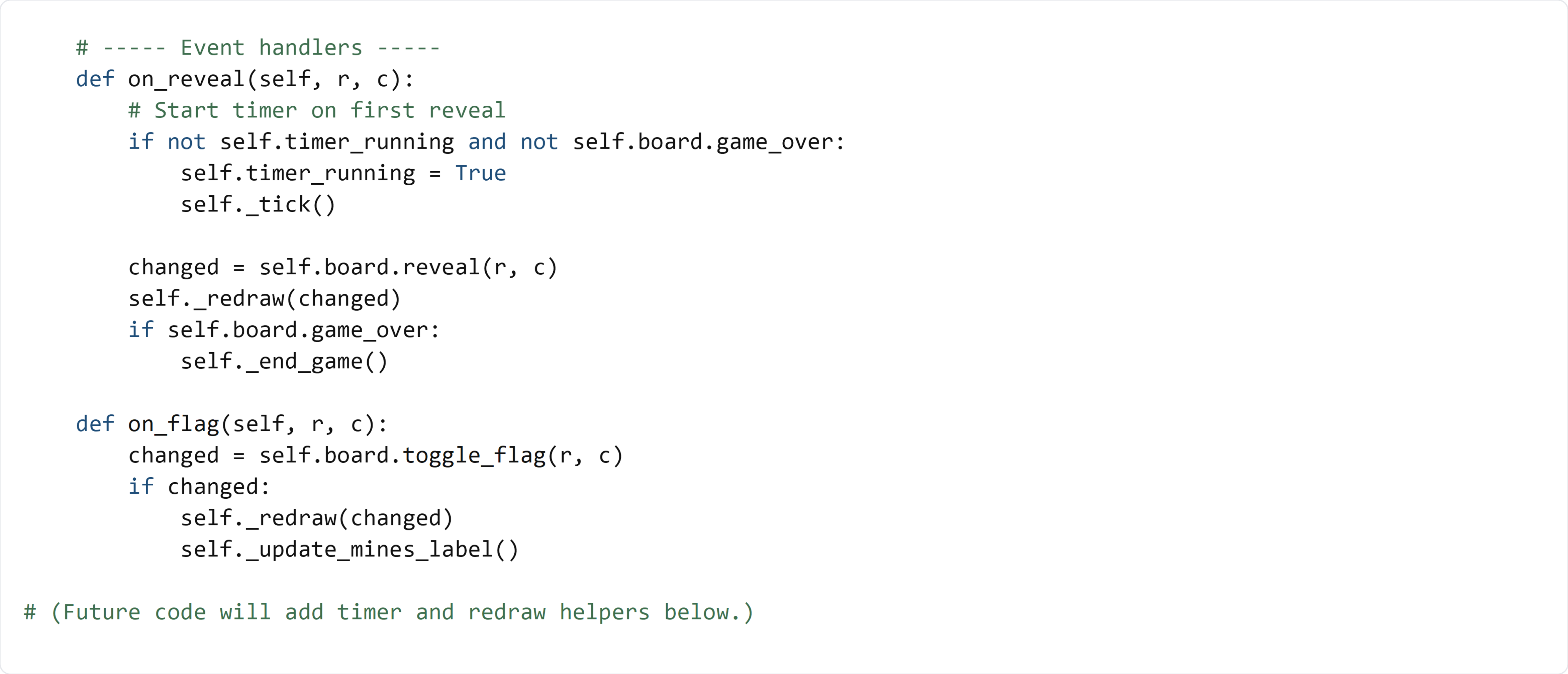
In on_reveal(), the timer logic comes first. That’s important because the timer should start as soon as the player makes their first reveal.
changed = self.board.reveal(r, c) runs the core game logic (including first-click mine placement and zero-flood). The UI does not guess what changed; it asks the model.
self._redraw(changed) is a UI helper you’ll write in a later section. It will loop through the changed coordinates and update the correct Tkinter buttons.
The if self.board.game_over: check happens after redraw so the final state is visible, then _end_game() can show messages and reveal mines.
In on_flag(), we only redraw and update the mines label if the model returns a non-empty change list. That prevents unnecessary UI work when the flag action is ignored (like trying to flag a revealed cell).
🧪 Test File (create s12_test.py)
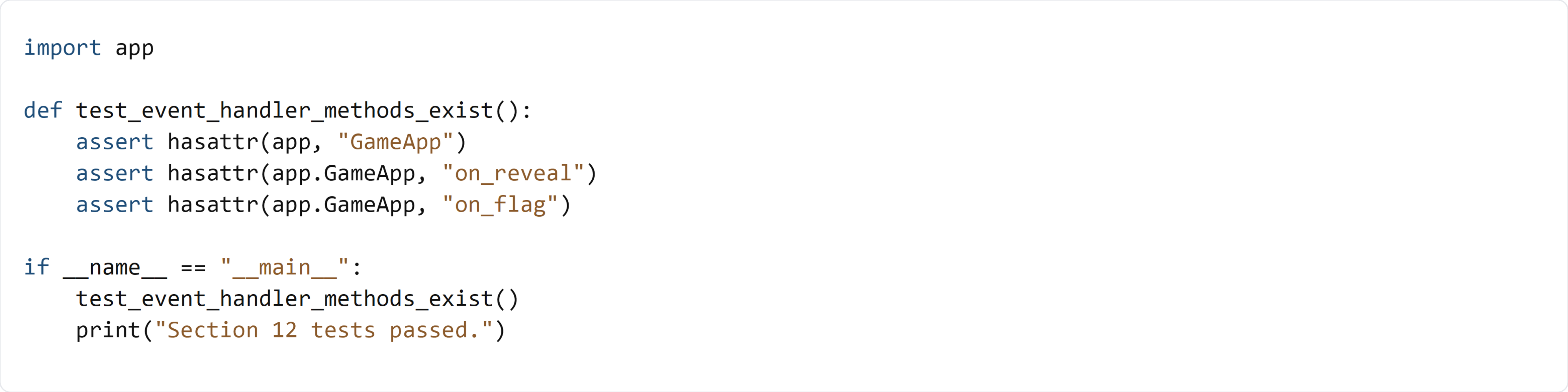
This test verifies that GameApp has the on_reveal() and on_flag() event handler methods. We don’t run the methods yet because they depend on UI helpers (_tick, _redraw, _end_game, _update_mines_label) and an initialized Board, which are added in upcoming sections.