🔁 Section 10: Board Lifecycle (New, Reset, Difficulty)
📝 Summary
In this section, you will add the “board lifecycle” methods to GameApp. These methods are responsible for starting a new game, restarting the current game, and changing difficulty. They also clear and rebuild the Tkinter widgets so the UI always matches the model.
✅ Checklist
- Add
set_difficulty()insideclass GameApp(after_make_menu) inapp.py. - Add
reset_board()to cancel the timer and clear the existing grid UI. - Add
_new_board()to create a freshBoardmodel and rebuild the UI. - Reset timer state and update the time label to
Time: 0s. - Destroy old cell buttons before building new ones.
- Bind the
F2key to restart the game.
🎓 Core Concepts
Board lifecycle: A “lifecycle” method is responsible for creating, resetting, and re-initializing the objects that make your app work. In Minesweeper, restarting isn’t just clearing the model—it also means destroying old UI buttons and creating a fresh set.
Keeping UI and model in sync: Your Board object stores the truth about the game. Your Tkinter buttons are just a visual representation. Whenever you start a new game, you must rebuild both so they match.
Clearing and rebuilding widgets: Tkinter widgets remain on screen until you remove them. winfo_children() returns the widgets inside a frame. Calling destroy() removes them cleanly so you can rebuild the grid.
Timer cleanup: Tkinter timers are usually scheduled with after(...), which returns an ID. If you restart the game without canceling the old timer, you can end up with multiple timers running at once. That’s why we cancel self.timer_id before resetting.
💻 Code to Write (inside class GameApp in app.py)
Type this by hand so you understand each piece.
🧠 Code Review & Key Concepts
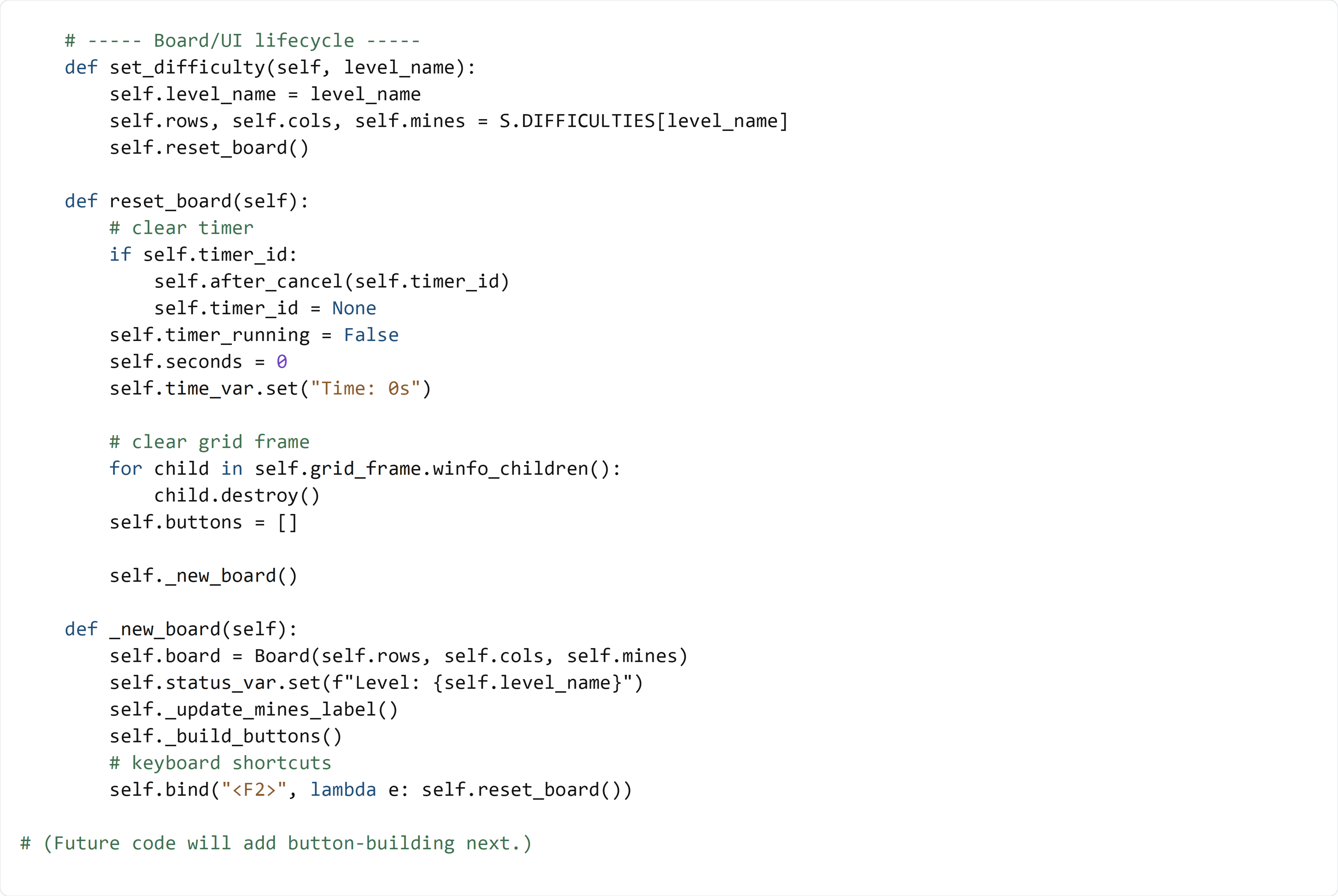
set_difficulty() updates the current preset values (rows, cols, mines) from settings.py, then restarts the game so the UI is rebuilt with the new size.
reset_board() is responsible for cleaning up the old game:
- It cancels any scheduled timer (after_cancel).
- It resets timer state and updates time_var (which updates the label automatically).
- It destroys every widget inside grid_frame so the old grid disappears.
_new_board() creates a fresh Board object (the model), updates the status label, updates the mines label, then rebuilds the grid buttons.
The F2 bind is a quality-of-life shortcut so users can restart quickly without using the menu or the reset button.
🧪 Test File (create s10_test.py)
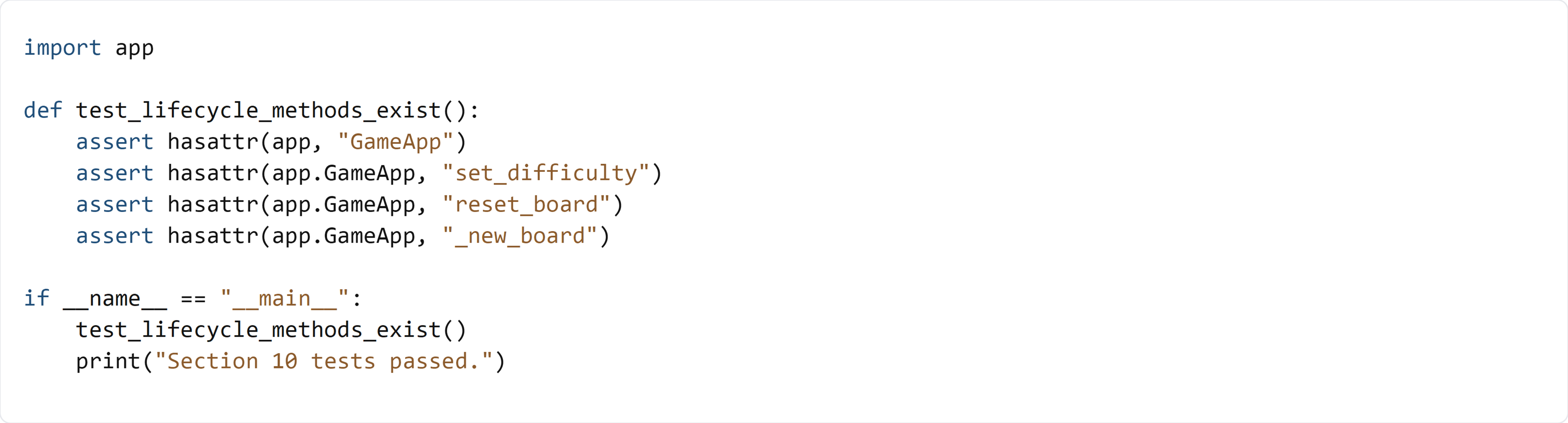
This test verifies that the lifecycle methods exist on GameApp. It does not instantiate the UI yet, because methods like _build_buttons() and _update_mines_label() are added in later sections and are required for _new_board() to fully run.