📋 Section 9: Menu + Difficulty
📝 Summary
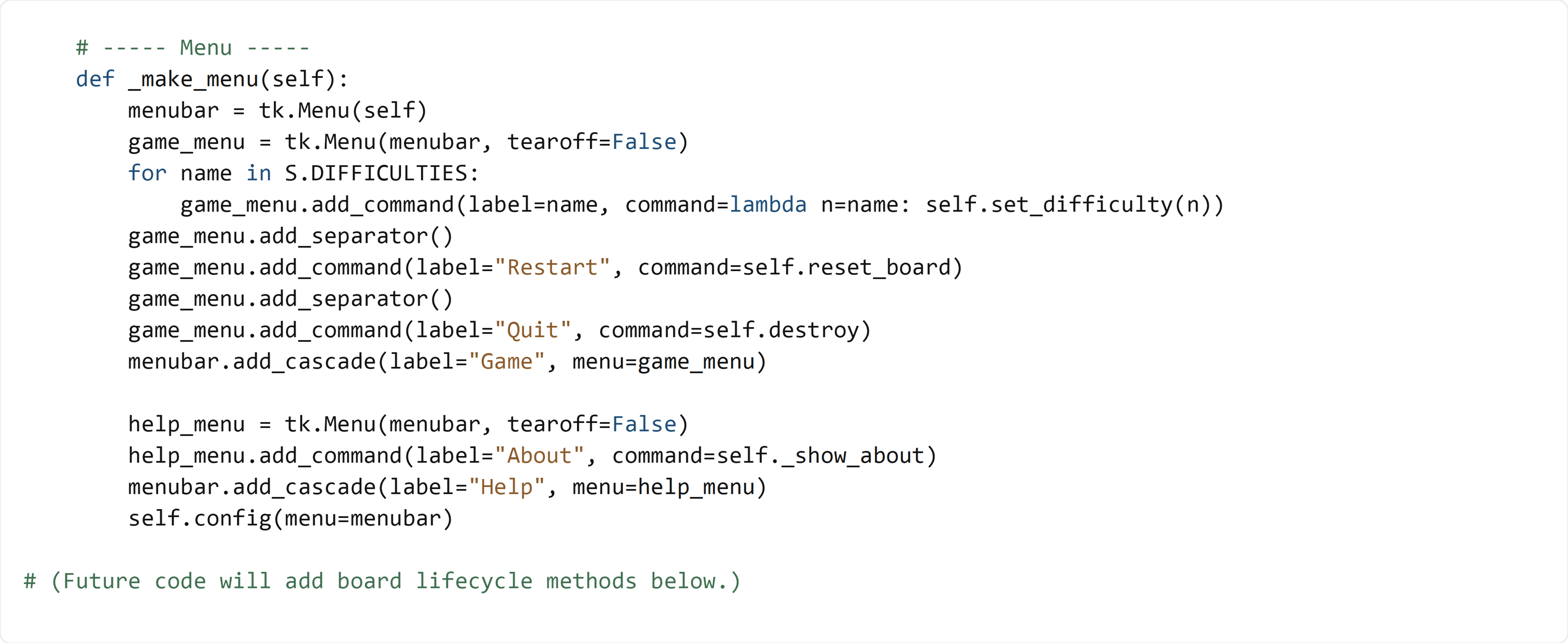
In this section, you will add a menu bar to your Tkinter app. The menu will let the player pick a difficulty, restart the game, quit the app, and open an “About” dialog.
✅ Checklist
- Add a
_make_menu()method insideclass GameApp(after__init__) inapp.py. - Create a
menubarand attach it to the window. - Build a
Gamemenu with difficulty presets fromsettings.py. - Use
lambdato pass the difficulty name intoset_difficulty(). - Add
RestartandQuitmenu actions. - Build a
Helpmenu with anAboutaction.
🎓 Core Concepts
Tkinter menus: A menu bar (tk.Menu) attaches to the main window. Inside it, you create sub-menus (like “Game” and “Help”) and add commands.
Callbacks (what happens when you click): When you add a command, you pass a function without calling it. For example, command=self.reset_board is correct (no parentheses). Tkinter will call it later when the user clicks.
Passing data with lambda: We want each difficulty option to call set_difficulty() with a specific name. If we wrote command=self.set_difficulty(name) inside the loop, it would run immediately while building the menu. Instead we use:
lambda n=name: self.set_difficulty(n)
That creates a tiny “wrapper function” that remembers the current name for that menu item.
Wiring UI actions to model changes: The menu doesn’t change the board directly. It calls app methods (like set_difficulty() and reset_board()), and those methods will handle updating the board and UI in later sections.
💻 Code to Write (inside class GameApp in app.py)
Type this by hand so you understand each piece.
🧠 Code Review & Key Concepts
menubar = tk.Menu(self) creates the top-level menu bar attached to the window.
tk.Menu(menubar, tearoff=False) makes a submenu. tearoff=False disables the dashed “tear off” line (cleaner for students/users).
The for name in S.DIFFICULTIES: loop automatically creates one menu command per preset in settings.py. If you add a new preset later, it will show up here without more UI changes.
lambda n=name: ... is the key line: it captures the current value of name so each menu item calls set_difficulty() with the correct difficulty.
self.config(menu=menubar) attaches the menu bar to the window so it appears at the top.
🧪 Test File (create s9_test.py)
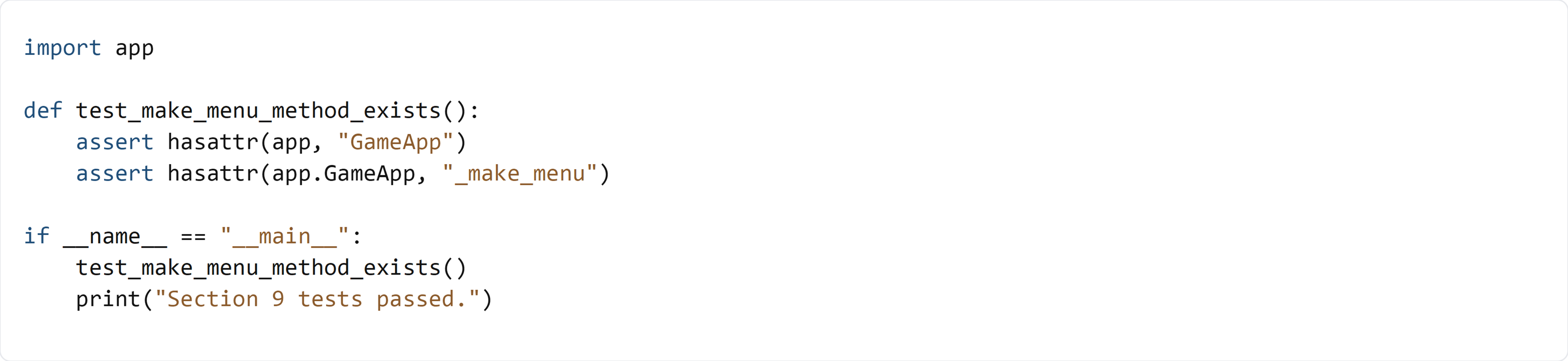
This test checks that GameApp has the _make_menu() method. We don’t instantiate the Tkinter window here because the class still depends on methods like set_difficulty() and _show_about() that will be implemented in later sections.