🚩 Section 5: Toggle Flag
📝 Summary
In this section, you will add a toggle_flag() method to the Board class. This lets the player mark (and unmark) a cell as a suspected mine, and it returns which cell changed so the Tkinter UI knows what to redraw.
✅ Checklist
- Add a new
toggle_flag(self, r, c)method insideclass Board(right after_place_mines). - Prevent flagging if the game is already over.
- Prevent flagging a cell that is already revealed.
- Flip (
toggle) the cell’sis_flaggedstate. - Update the board’s flag counter and return the changed coordinate.
🎓 Core Concepts
“Toggling” means switching a value back and forth. For flags, we flip cell.is_flagged from False to True (place a flag) or from True back to False (remove a flag).
This method is a player action: it changes game state based on an input (right-click). That means it must also protect the model from invalid actions. We use guard checks (early returns) to enforce rules: - If the game is over, ignore actions. This prevents changes after win/loss. - If the cell is already revealed, it should not be flaggable. Flags are only for hidden squares.
We also keep a board-level counter, _flags, because the UI needs quick access to “how many flags are currently placed.” That value is used to display an estimate of remaining mines.
Finally, this method returns a list of “changed cells” like [(r, c)]. The Tkinter layer can use that list to update only the buttons that need to change, instead of redrawing the whole board every time.
This “return changed coordinates” pattern is a key design idea in this project: - The model does the work and decides what changed. - The UI redraws only what the model says changed. That keeps your code organized and your UI fast.
💻 Code to Write (inside class Board in model.py)
Type this by hand so you understand each piece.
🧠 Code Review & Key Concepts
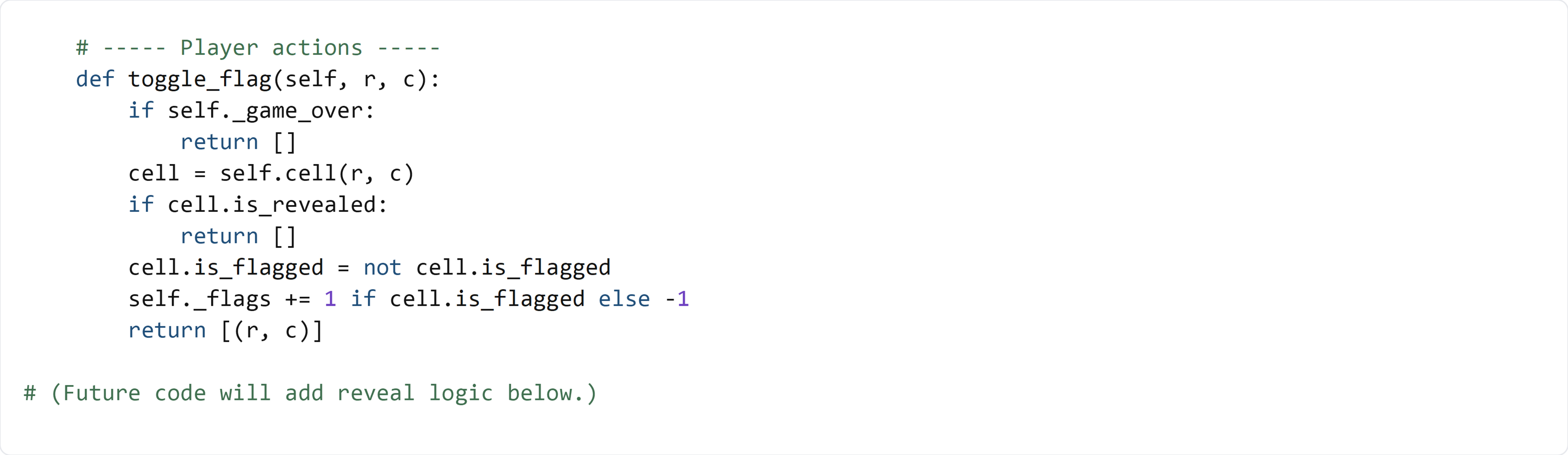
if self._game_over: return [] is a guard clause. It stops the function immediately when the action should not do anything.
cell = self.cell(r, c) uses the board’s accessor method. Even though it currently returns self.grid[r][c], having an accessor keeps your API stable and makes the rest of the code clearer.
if cell.is_revealed: return [] enforces the rule “no flagging revealed squares.”
cell.is_flagged = not cell.is_flagged performs the toggle in one line. After this line, the cell has the new flag state.
self._flags += 1 if cell.is_flagged else -1 updates the board’s flag counter based on the new state:
- If we just placed a flag, add 1.
- If we just removed a flag, subtract 1.
Returning [(r, c)] gives the UI a simple “update list” it can loop through to redraw only what changed.
Notice what this method does not do: - It does not check if the flag is “correct.” - It does not end the game. Flags are a player tool. The win condition is handled by reveals (when all safe cells are revealed), not by flag placement.
🧪 Test File (create s5_test.py)
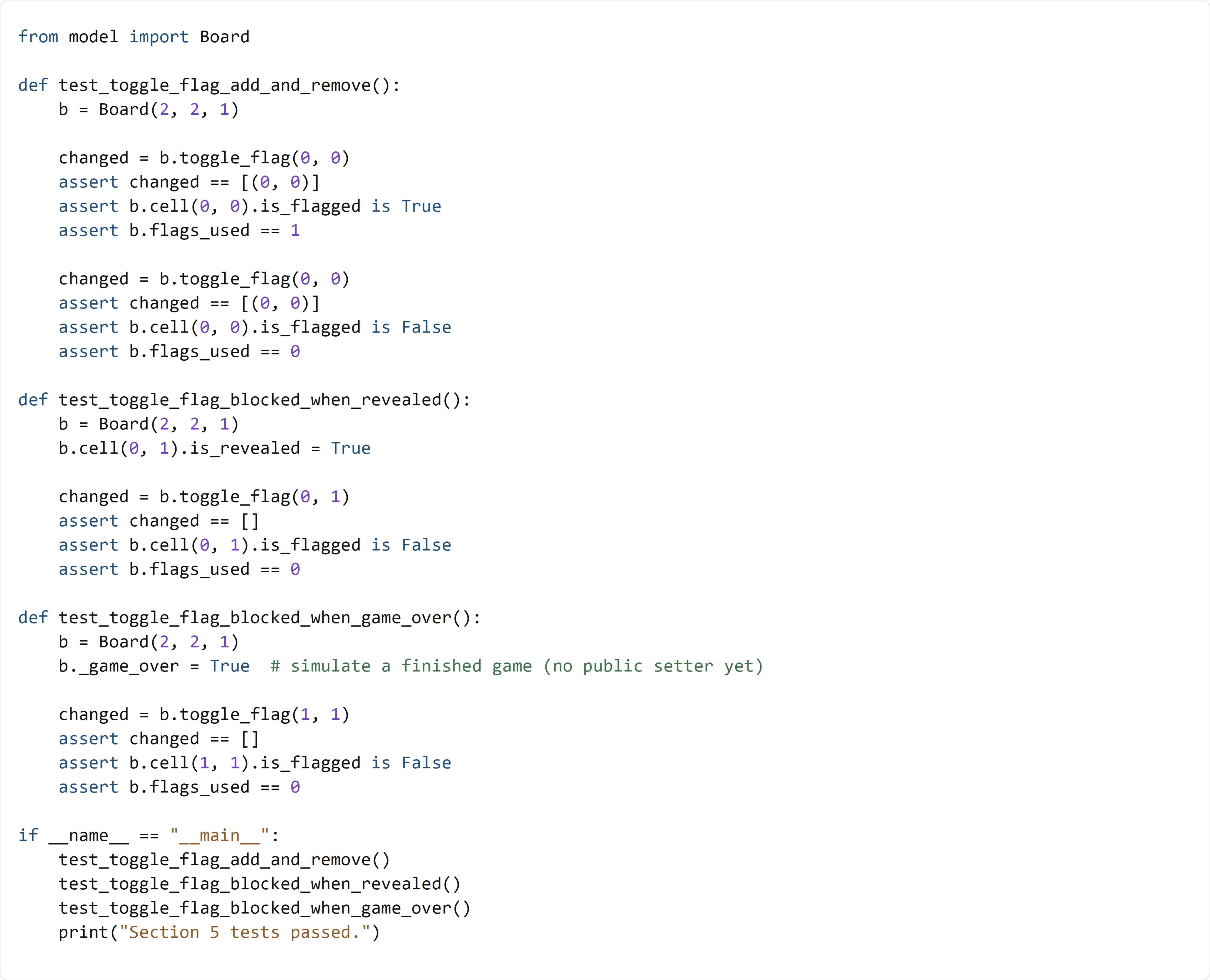
This test verifies three behaviors:
- Toggling a covered cell adds a flag, then removes it, and the flags_used counter updates correctly.
- Revealed cells cannot be flagged (the method returns [] and nothing changes).
- When the board is in a game-over state, flag actions are ignored. For now, the test sets b._game_over = True directly to simulate that condition.