🧭 Section 4: Neighbors + Mine Placement
📝 Summary
In this section, you will add helper methods inside the Board class to find neighboring cells, place mines after the first click, and compute adjacent mine counts. This prepares the exact values the Tkinter UI will display.
✅ Checklist
- Add the
_neighborshelper insideBoardafter the getters. - Add
_place_minesto place mines after the first click. - Reserve a safe zone so the first click and its neighbors are never mines.
- Compute each cell’s
adjacentmine count. - Mark that mines have been placed.
🎓 Core Concepts
Neighbors are all eight surrounding squares around a cell (including diagonals). Minesweeper depends on neighbors for two big features: - Counting adjacent mines (to show 1–8 on revealed cells). - Flood-revealing empty areas (coming soon), which also needs a way to “walk” to nearby cells.
Mines are placed after the first click so the player never loses instantly. A safe zone includes the first clicked cell and all of its neighbors, guaranteeing a fair start.
The _neighbors(...) method is written as a generator (it uses yield). A generator lets you loop over neighbors one at a time without building a big list first. It’s a clean pattern for grid games.
After mines are placed, every non-mine cell needs a number telling how many adjacent mines it touches. This number is what the Tkinter UI will render on each button when a cell is revealed.
This section also introduces an important “game feel” rule: first-click safety. By placing mines only after the first click, the game can guarantee the first click won’t be a mine, and it can also reserve a small safe area so the first click is useful.
💻 Code to Write (inside class Board in model.py)
Type this by hand so you understand each piece.
🧠 Code Review & Key Concepts
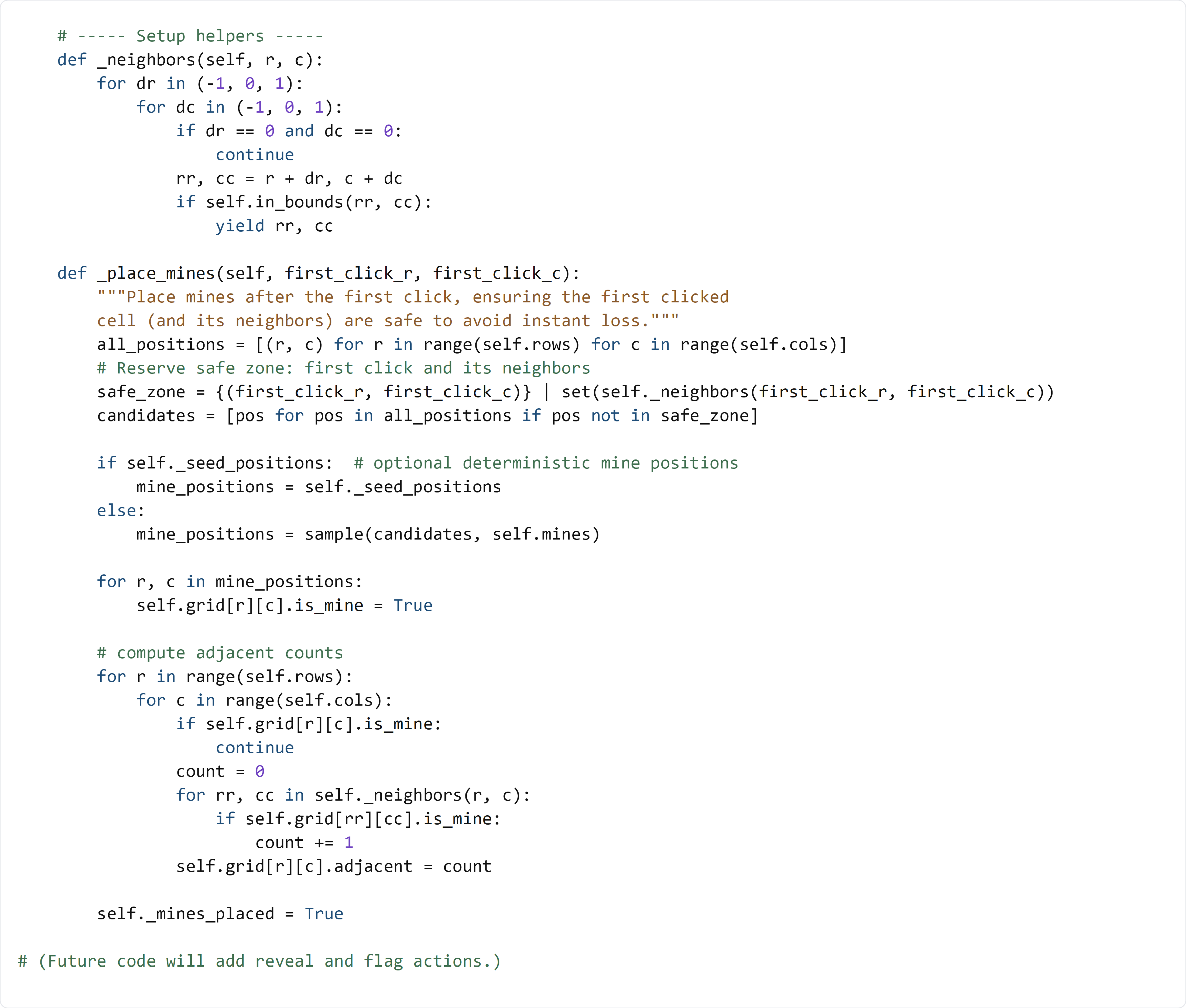
_neighbors loops through row/col offsets -1, 0, 1 to generate all surrounding coordinates. The if dr == 0 and dc == 0 line skips the cell itself, and in_bounds(...) prevents out-of-range positions.
safe_zone = {(first_click_r, first_click_c)} | set(self._neighbors(...)) uses set union (|) to combine:
- the first clicked coordinate,
- and all its neighbors.
Anything in the safe zone is removed from the list of mine candidates.
candidates = [pos for pos in all_positions if pos not in safe_zone] builds a list of valid mine positions. This list comprehension is a compact way to “filter” positions.
If _seed_positions is provided, the board uses those positions instead of randomness. That’s mainly for tests, so you can control exactly where mines go.
sample(candidates, self.mines) randomly picks unique mine positions. sample never returns duplicates, which is exactly what we want (you can’t place two mines in the same cell).
The adjacency-count loop works like this:
- Skip cells that are mines (they don’t need a number).
- For every other cell, loop over its neighbors.
- Count how many neighbors are mines.
- Store the count into cell.adjacent.
Finally, self._mines_placed = True records that the board is now “ready.” The reveal logic will check this flag so mines are only placed once.
🧪 Test File (create s4_test.py)
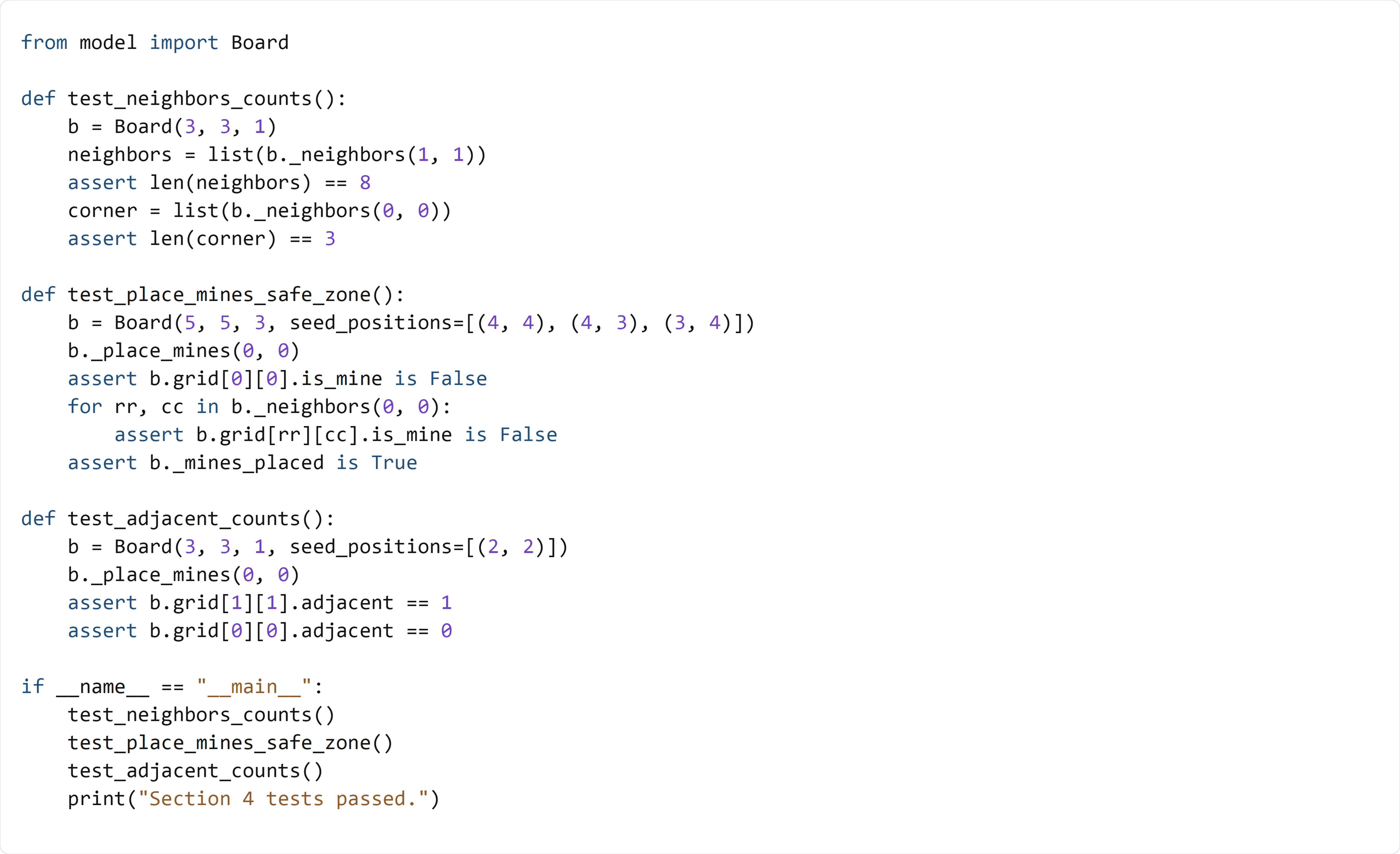
This test checks neighbor generation for center and corner cells, verifies the safe zone has no mines, and confirms that adjacent mine counts are computed correctly.