🧭 Section 1: Project Constants (settings.py)
📝 Summary
In this section, you will create a settings.py file that stores all the game constants in one place. This makes the project easier to update because fonts, colors, and difficulty presets are all centralized.
✅ Checklist
- Create a new file named
settings.pyin the project root. - Add the difficulty presets dictionary.
- Add UI sizing and font constants.
- Add color constants for numbers, covered cells, revealed cells, flags, and mines.
- Keep all constants at the top of the file.
🎓 Core Concepts
Constants are values you treat as fixed while the program runs. In Python, constants aren’t “locked,” but we follow a convention: use ALL CAPS names (like FONT_CELL) to communicate “don’t change this during the game.”
Putting constants in a separate module (settings.py) is a big maintainability win:
- Your UI code (app.py) stays focused on Tkinter logic instead of being cluttered with colors and fonts.
- Your model code (model.py) can stay focused on the game rules.
- If you want to tweak the look or difficulty, you change one file and the whole project updates.
A dictionary is a collection of key-value pairs. We use two dictionaries:
- DIFFICULTIES maps a difficulty name to a tuple: (rows, cols, mines).
- NUMBER_COLORS maps the number of adjacent mines (1 through 8) to a color the UI will use when the cell is revealed.
Tuples are good here because the values come as a fixed package of three related items. When you see (16, 30, 99), that always means (rows, cols, mines) in that order.
Tkinter styling uses regular Python values:
- Fonts are tuples like ("Helvetica", 12, "bold").
- Colors are usually hex strings like "#BDBDBD" (two hex digits each for red, green, and blue).
Later, the app will import this file as import settings as S and use values like S.FONT_INFO and S.COLOR_COVERED when it creates and updates buttons and labels.
💻 Code to Write (in settings.py)
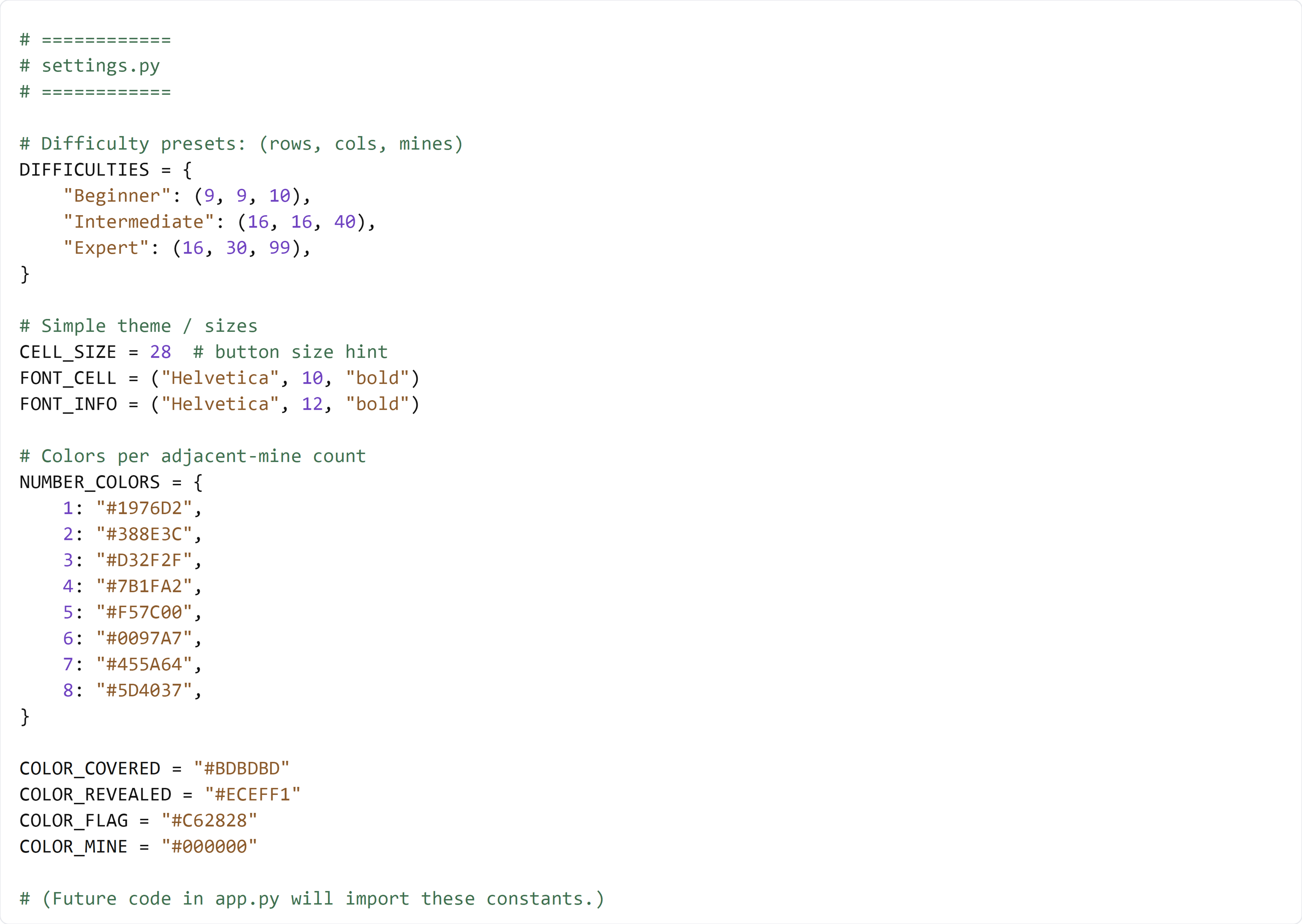
Type this by hand so you understand each piece. Since this file is all settings/constants, keep everything at the top of the file and do not place new constants in the middle of other code.
🧠 Code Review & Key Concepts
DIFFICULTIES is the “preset table” for the game. The menu will loop over its keys ("Beginner", "Intermediate", "Expert") and use the tuple to rebuild the board size and mine count.
CELL_SIZE is a single “size knob” for the UI. Even though the early versions of the app may not use it yet, keeping a constant like this makes future layout adjustments easier.
FONT_CELL and FONT_INFO are Tkinter font tuples. They keep the grid text (numbers/mines/flags) and the info-bar text consistent across the app.
NUMBER_COLORS is a lookup table for revealed numbers. When a cell has adjacent == 3, the UI can do something like NUMBER_COLORS[3] to pick the correct color for the number.
COLOR_COVERED vs COLOR_REVEALED expresses an important UI rule: covered cells should look clickable, and revealed cells should look “pressed” and disabled. Keeping these as constants helps your UI logic stay simple.
COLOR_FLAG and COLOR_MINE support end-game clarity. Even if you change the flag icon or mine icon later, the color choices live here so you can theme the whole game in one place.
🧪 Test File (create s1_test.py)
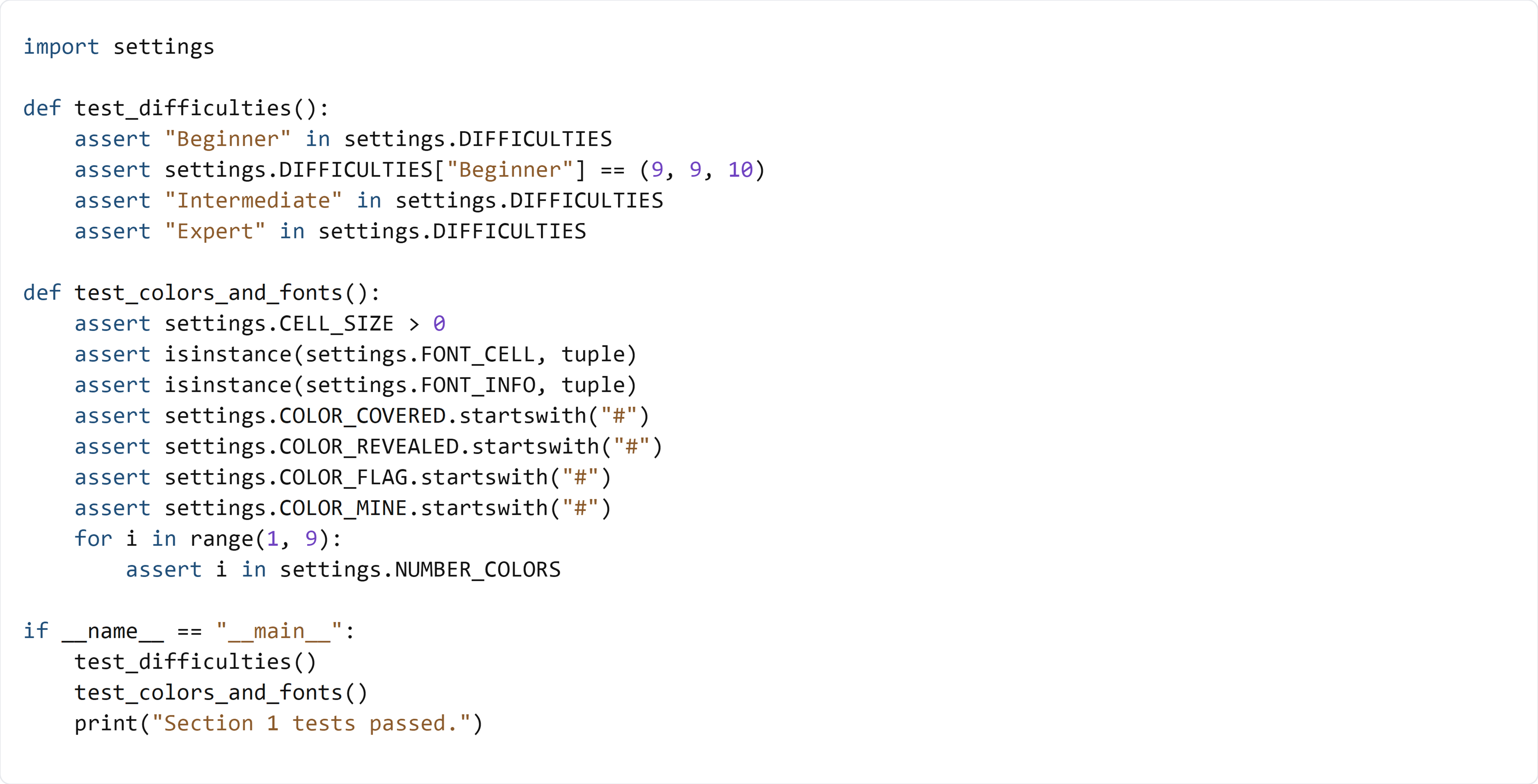
This test imports settings and confirms the difficulty presets, fonts, sizes, and color mappings exist and look correct. If all assertions pass, it prints a success message.